Sony apparently switched IP blocks and now people are having trouble logging into games and such due to their ISP caching the DNS. You can either wait for DNS cache at your ISP to expire, or just change your DNS settings.
I like Google DNS. Google is fabulous, doesn't cache for long, and does no censoring or redirecting. Anyhow, I did it for Windows 7, see the screenshot to follow along!
Tuesday, July 15, 2014
Thursday, April 17, 2014
PHP Federation Libraries
With federation technologies running rampant, I've been working with different methods of providing federated SSO between different applications. As I go through this process, I always look to see if someone else has developed a library to make my life easier. In the case of PHP, I have found a couple libraries that are very promising for making a retrofit to applications simple for OAUTH and SAML. They are:
Enjoy
Wednesday, April 9, 2014
DirXML-Associations nameSpace wildcard magic number
When constructing a query for the DirXML-Associations attribute, I wanted to find a specific entitlement value. In order to construct the query, I need all 3 parts of the structured attribute, which are nameSpace, volume, and path. Volume is the DN of the entitlement object. Path is the XML value of the entitlement. nameSpace is the status of the entitlement as it it relates to the user. The nameSpace attribute will NOT allow you to use a simple "*" wildcard. Turns out, there is a "Magic Number" that is used in place of the wildcard. That magic number is 4278190086. Took quite a bit of Googling to find this.
Now, I tried the same thing on the nrfEntitlementRef attribute for nrfResource objects and it does NOT work - the error returned looks like:
<status level="error">Code(-9053) One or more errors occurred whileTo work around, I simply did two queries and stuffed their values in the same nodeset (in DirXML - I've been told the magic number works for LDAP calls). It seems the only values it gets for nameSpace are 0 and 1. When setting my local variable nodeset - I simply included the same query with both values. If I find a different value, I'll be sure to update this blog post.
processing a query: Code(-8009) Error processing <search-attr>:
java.lang.NumberFormatException: For input string: "4278190086".</status>
Labels:
IDM,
NetIQ,
Novell,
Novell IDM Drivers,
Query
Thursday, April 3, 2014
Adding custom links to NetIQ User Application
Working with a client that is using the SSPR 3.0 tool with NetIQ Identity Manager. Within the User Application, it has a link for challenge response, but does not link out to SSPR, it uses the internal pages. We wanted to have this link go over to SSPR instead. It wasn't as intuitive as I would have liked to simply create a link in its place.
I went into User Application as the uaadmin, clicked on administration, then on page admin. I selected the Password Challenge Response portlet, then selected "select contents" on the page. I removed the item it was using and added "Message" and saved back out to the main screen. Now, I needed to click "arrange content", edited the "Message" element, then selected "View/edit custom preference" for the message. At the bottom, there is a checkbox for "View source". I put the following as my message:
<META HTTP-EQUIV="refresh" content="0;URL=https://idm.example.com/sspr/"><SCRIPT LANGUAGE="JavaScript"><!--window.location="https://idm.example.com/sspr/";// --></script>Magic voodoo happening in the background to take you to the SSPRpage, if the voodoo master is going too slow, you can use this link:<a href="https://idm.example.com/sspr/">SSPR Home</a>
Labels:
IDM,
NetIQ,
rbpm,
SSPR,
User Application
Thursday, March 27, 2014
NetIQ IDM User Application error starting up
Finished up an installation of User Application, also known as Roles Based Provisioning Module (RBPM), and went to start it up when the following appeared in my log file:
I actually saw this exact error a few weeks ago when I was installing my development instance and it was the result of the firewall port for the database server. It was a bit confusing because I was seeing an established connection to my database server on the correct port (5432 in this case, since I'm using PostgreSQL). I eventually contacted the firewall admins and sure enough, my traffic was being blocked. Opened the port and bingo, everything was happy.
2014-03-27 08:22:29,168 INFO [org.jboss.resource.connectionmanager.ConnectionFactoryBindingService] (main) Bound ConnectionManager 'jboss.jca:service=DataSourceBinding,name=IDMUADataSource' to JNDI name 'java:IDMUADataSource'
2014-03-27 08:27:29,197 WARN [com.arjuna.ats.arjuna.logging.arjLoggerI18N] (Thread-16) [com.arjuna.ats.arjuna.coordinator.TransactionReaper_18] - TransactionReaper::check timeout for TX -53ef986e:850b:53341802:a in state RUN
2014-03-27 08:27:29,199 WARN [com.arjuna.ats.arjuna.logging.arjLoggerI18N] (Thread-17) [com.arjuna.ats.arjuna.coordinator.BasicAction_58] - Abort of action id -53ef986e:850b:53341802:a invoked while multiple threads active within it.
2014-03-27 08:27:29,200 WARN [com.arjuna.ats.arjuna.logging.arjLoggerI18N] (Thread-17) [com.arjuna.ats.arjuna.coordinator.CheckedAction_2] - CheckedAction::check - atomic action -53ef986e:850b:53341802:a aborting with 1 threads active!
2014-03-27 08:27:29,200 WARN [com.arjuna.ats.arjuna.logging.arjLoggerI18N] (Thread-17) [com.arjuna.ats.arjuna.coordinator.TransactionReaper_7] - TransactionReaper::doCancellations worker Thread[Thread-17,5,jboss] successfully canceled TX -53ef986e:850b:53341802:a
2014-03-27 08:38:00,993 WARN [org.jboss.resource.connectionmanager.JBossManagedConnectionPool] (main) Throwable while attempting to get a new connection: null
org.jboss.resource.JBossResourceException: Could not create connection; - nested throwable: (org.postgresql.util.PSQLException: The connection attempt failed.)
at org.jboss.resource.adapter.jdbc.local.LocalManagedConnectionFactory.getLocalManagedConnection(LocalManagedConnectionFactory.java:225)
at org.jboss.resource.adapter.jdbc.local.LocalManagedConnectionFactory.createManagedConnection(LocalManagedConnectionFactory.java:195)
at org.jboss.resource.connectionmanager.InternalManagedConnectionPool.createConnectionEventListener(InternalManagedConnectionPool.java:633)
at org.jboss.resource.connectionmanager.InternalManagedConnectionPool.getConnection(InternalManagedConnectionPool.java:267)
at org.jboss.resource.connectionmanager.JBossManagedConnectionPool$BasePool.getConnection(JBossManagedConnectionPool.java:679)
at org.jboss.resource.connectionmanager.BaseConnectionManager2.getManagedConnection(BaseConnectionManager2.java:404)
at org.jboss.resource.connectionmanager.TxConnectionManager.getManagedConnection(TxConnectionManager.java:381)
at org.jboss.resource.connectionmanager.BaseConnectionManager2.allocateConnection(BaseConnectionManager2.java:496)
at org.jboss.resource.connectionmanager.BaseConnectionManager2$ConnectionManagerProxy.allocateConnection(BaseConnectionManager2.java:941)
at org.jboss.resource.adapter.jdbc.WrapperDataSource.getConnection(WrapperDataSource.java:89)
at org.jboss.messaging.core.impl.JDBCSupport.createSchema(JDBCSupport.java:287)
at org.jboss.messaging.core.impl.JDBCSupport.start(JDBCSupport.java:167)
at org.jboss.jms.server.plugin.JDBCJMSUserManager.start(JDBCJMSUserManager.java:98)
at org.jboss.jms.server.plugin.JDBCJMSUserManagerService.startService(JDBCJMSUserManagerService.java:78)
at org.jboss.system.ServiceMBeanSupport.jbossInternalStart(ServiceMBeanSupport.java:376)
at org.jboss.system.ServiceMBeanSupport.start(ServiceMBeanSupport.java:269)
at sun.reflect.NativeMethodAccessorImpl.invoke0(Native Method)
at sun.reflect.NativeMethodAccessorImpl.invoke(Unknown Source)
at sun.reflect.DelegatingMethodAccessorImpl.invoke(Unknown Source)
at java.lang.reflect.Method.invoke(Unknown Source)
at org.jboss.mx.interceptor.ReflectedDispatcher.invoke(ReflectedDispatcher.java:157)
at org.jboss.mx.server.Invocation.dispatch(Invocation.java:96)
at org.jboss.mx.interceptor.AbstractInterceptor.invoke(AbstractInterceptor.java:138)
at org.jboss.mx.server.Invocation.invoke(Invocation.java:90)
at org.jboss.mx.interceptor.ModelMBeanOperationInterceptor.invoke(ModelMBeanOperationInterceptor.java:140)
at org.jboss.mx.server.Invocation.invoke(Invocation.java:90)
at org.jboss.mx.server.AbstractMBeanInvoker.invoke(AbstractMBeanInvoker.java:264)
at org.jboss.mx.server.MBeanServerImpl.invoke(MBeanServerImpl.java:668)
at org.jboss.system.microcontainer.ServiceProxy.invoke(ServiceProxy.java:206)
at $Proxy38.start(Unknown Source)
at org.jboss.system.microcontainer.StartStopLifecycleAction.installAction(StartStopLifecycleAction.java:42)
at org.jboss.system.microcontainer.StartStopLifecycleAction.installAction(StartStopLifecycleAction.java:37)
at org.jboss.dependency.plugins.action.SimpleControllerContextAction.simpleInstallAction(SimpleControllerContextAction.java:62)
at org.jboss.dependency.plugins.action.AccessControllerContextAction.install(AccessControllerContextAction.java:71)
at org.jboss.dependency.plugins.AbstractControllerContextActions.install(AbstractControllerContextActions.java:51)
at org.jboss.dependency.plugins.AbstractControllerContext.install(AbstractControllerContext.java:348)
at org.jboss.system.microcontainer.ServiceControllerContext.install(ServiceControllerContext.java:286)
at org.jboss.dependency.plugins.AbstractController.install(AbstractController.java:1631)
at org.jboss.dependency.plugins.AbstractController.incrementState(AbstractController.java:934)
at org.jboss.dependency.plugins.AbstractController.resolveContexts(AbstractController.java:1082)
at org.jboss.dependency.plugins.AbstractController.resolveContexts(AbstractController.java:984)
at org.jboss.dependency.plugins.AbstractController.change(AbstractController.java:822)
at org.jboss.dependency.plugins.AbstractController.change(AbstractController.java:553)
at org.jboss.system.ServiceController.doChange(ServiceController.java:688)
at org.jboss.system.ServiceController.start(ServiceController.java:460)
at org.jboss.system.deployers.ServiceDeployer.start(ServiceDeployer.java:163)
at org.jboss.system.deployers.ServiceDeployer.deploy(ServiceDeployer.java:99)
at org.jboss.system.deployers.ServiceDeployer.deploy(ServiceDeployer.java:46)
at org.jboss.deployers.spi.deployer.helpers.AbstractSimpleRealDeployer.internalDeploy(AbstractSimpleRealDeployer.java:62)
at org.jboss.deployers.spi.deployer.helpers.AbstractRealDeployer.deploy(AbstractRealDeployer.java:50)
at org.jboss.deployers.plugins.deployers.DeployerWrapper.deploy(DeployerWrapper.java:171)
at org.jboss.deployers.plugins.deployers.DeployersImpl.doDeploy(DeployersImpl.java:1439)
at org.jboss.deployers.plugins.deployers.DeployersImpl.doInstallParentFirst(DeployersImpl.java:1157)
at org.jboss.deployers.plugins.deployers.DeployersImpl.doInstallParentFirst(DeployersImpl.java:1178)
at org.jboss.deployers.plugins.deployers.DeployersImpl.install(DeployersImpl.java:1098)
at org.jboss.dependency.plugins.AbstractControllerContext.install(AbstractControllerContext.java:348)
at org.jboss.dependency.plugins.AbstractController.install(AbstractController.java:1631)
at org.jboss.dependency.plugins.AbstractController.incrementState(AbstractController.java:934)
at org.jboss.dependency.plugins.AbstractController.resolveContexts(AbstractController.java:1082)
at org.jboss.dependency.plugins.AbstractController.resolveContexts(AbstractController.java:984)
at org.jboss.dependency.plugins.AbstractController.change(AbstractController.java:822)
at org.jboss.dependency.plugins.AbstractController.change(AbstractController.java:553)
at org.jboss.deployers.plugins.deployers.DeployersImpl.process(DeployersImpl.java:781)
at org.jboss.deployers.plugins.main.MainDeployerImpl.process(MainDeployerImpl.java:702)
at org.jboss.system.server.profileservice.repository.MainDeployerAdapter.process(MainDeployerAdapter.java:117)
at org.jboss.system.server.profileservice.repository.ProfileDeployAction.install(ProfileDeployAction.java:70)
at org.jboss.system.server.profileservice.repository.AbstractProfileAction.install(AbstractProfileAction.java:53)
at org.jboss.system.server.profileservice.repository.AbstractProfileService.install(AbstractProfileService.java:361)
at org.jboss.dependency.plugins.AbstractControllerContext.install(AbstractControllerContext.java:348)
at org.jboss.dependency.plugins.AbstractController.install(AbstractController.java:1631)
at org.jboss.dependency.plugins.AbstractController.incrementState(AbstractController.java:934)
at org.jboss.dependency.plugins.AbstractController.resolveContexts(AbstractController.java:1082)
at org.jboss.dependency.plugins.AbstractController.resolveContexts(AbstractController.java:984)
at org.jboss.dependency.plugins.AbstractController.change(AbstractController.java:822)
at org.jboss.dependency.plugins.AbstractController.change(AbstractController.java:553)
at org.jboss.system.server.profileservice.repository.AbstractProfileService.activateProfile(AbstractProfileService.java:306)
at org.jboss.system.server.profileservice.ProfileServiceBootstrap.start(ProfileServiceBootstrap.java:271)
at org.jboss.bootstrap.AbstractServerImpl.start(AbstractServerImpl.java:461)
at org.jboss.Main.boot(Main.java:221)
at org.jboss.Main$1.run(Main.java:556)
at java.lang.Thread.run(Unknown Source)
Caused by: org.postgresql.util.PSQLException: The connection attempt failed.
at org.postgresql.core.v3.ConnectionFactoryImpl.openConnectionImpl(ConnectionFactoryImpl.java:137)
at org.postgresql.core.ConnectionFactory.openConnection(ConnectionFactory.java:66)
at org.postgresql.jdbc2.AbstractJdbc2Connection.<init>(AbstractJdbc2Connection.java:124)
at org.postgresql.jdbc3.AbstractJdbc3Connection.<init>(AbstractJdbc3Connection.java:30)
at org.postgresql.jdbc3.Jdbc3Connection.<init>(Jdbc3Connection.java:24)
at org.postgresql.Driver.makeConnection(Driver.java:386)
at org.postgresql.Driver.connect(Driver.java:260)
at org.jboss.resource.adapter.jdbc.local.LocalManagedConnectionFactory.getLocalManagedConnection(LocalManagedConnectionFactory.java:207)
... 80 more
Caused by: java.net.SocketException: Connection timed out
at java.net.SocketInputStream.socketRead0(Native Method)
at java.net.SocketInputStream.read(Unknown Source)
at org.postgresql.core.VisibleBufferedInputStream.readMore(VisibleBufferedInputStream.java:135)
at org.postgresql.core.VisibleBufferedInputStream.ensureBytes(VisibleBufferedInputStream.java:104)
at org.postgresql.core.VisibleBufferedInputStream.read(VisibleBufferedInputStream.java:73)
at org.postgresql.core.PGStream.ReceiveChar(PGStream.java:259)
at org.postgresql.core.v3.ConnectionFactoryImpl.doAuthentication(ConnectionFactoryImpl.java:254)
at org.postgresql.core.v3.ConnectionFactoryImpl.openConnectionImpl(ConnectionFactoryImpl.java:95)
... 87 more
2014-03-27 08:38:01,001 WARN [com.arjuna.ats.arjuna.logging.arjLoggerI18N] (main) [com.arjuna.ats.arjuna.coordinator.BasicAction_40] - Abort called on already aborted atomic action -53ef986e:850b:53341802:a
2014-03-27 08:38:01,006 ERROR [org.jboss.messaging.util.ExceptionUtil] (main) org.jboss.jms.server.plugin.JDBCJMSUserManagerService@502f35 startService
javax.transaction.RollbackException: [com.arjuna.ats.internal.jta.transaction.arjunacore.inactive] [com.arjuna.ats.internal.jta.transaction.arjunacore.inactive] The transaction is not active!
at com.arjuna.ats.internal.jta.transaction.arjunacore.TransactionImple.commitAndDisassociate(TransactionImple.java:1414)
at com.arjuna.ats.internal.jta.transaction.arjunacore.BaseTransaction.commit(BaseTransaction.java:137)
at com.arjuna.ats.jbossatx.BaseTransactionManagerDelegate.commit(BaseTransactionManagerDelegate.java:75)
at org.jboss.messaging.core.impl.JDBCSupport$TransactionWrapper.end(JDBCSupport.java:354)
at org.jboss.messaging.core.impl.JDBCSupport.createSchema(JDBCSupport.java:321)
at org.jboss.messaging.core.impl.JDBCSupport.start(JDBCSupport.java:167)
at org.jboss.jms.server.plugin.JDBCJMSUserManager.start(JDBCJMSUserManager.java:98)
at org.jboss.jms.server.plugin.JDBCJMSUserManagerService.startService(JDBCJMSUserManagerService.java:78)
at org.jboss.system.ServiceMBeanSupport.jbossInternalStart(ServiceMBeanSupport.java:376)
at org.jboss.system.ServiceMBeanSupport.start(ServiceMBeanSupport.java:269)
at sun.reflect.NativeMethodAccessorImpl.invoke0(Native Method)
at sun.reflect.NativeMethodAccessorImpl.invoke(Unknown Source)
at sun.reflect.DelegatingMethodAccessorImpl.invoke(Unknown Source)
at java.lang.reflect.Method.invoke(Unknown Source)
at org.jboss.mx.interceptor.ReflectedDispatcher.invoke(ReflectedDispatcher.java:157)
at org.jboss.mx.server.Invocation.dispatch(Invocation.java:96)
at org.jboss.mx.interceptor.AbstractInterceptor.invoke(AbstractInterceptor.java:138)
at org.jboss.mx.server.Invocation.invoke(Invocation.java:90)
at org.jboss.mx.interceptor.ModelMBeanOperationInterceptor.invoke(ModelMBeanOperationInterceptor.java:140)
at org.jboss.mx.server.Invocation.invoke(Invocation.java:90)
at org.jboss.mx.server.AbstractMBeanInvoker.invoke(AbstractMBeanInvoker.java:264)
at org.jboss.mx.server.MBeanServerImpl.invoke(MBeanServerImpl.java:668)
at org.jboss.system.microcontainer.ServiceProxy.invoke(ServiceProxy.java:206)
at $Proxy38.start(Unknown Source)
at org.jboss.system.microcontainer.StartStopLifecycleAction.installAction(StartStopLifecycleAction.java:42)
at org.jboss.system.microcontainer.StartStopLifecycleAction.installAction(StartStopLifecycleAction.java:37)
at org.jboss.dependency.plugins.action.SimpleControllerContextAction.simpleInstallAction(SimpleControllerContextAction.java:62)
at org.jboss.dependency.plugins.action.AccessControllerContextAction.install(AccessControllerContextAction.java:71)
at org.jboss.dependency.plugins.AbstractControllerContextActions.install(AbstractControllerContextActions.java:51)
at org.jboss.dependency.plugins.AbstractControllerContext.install(AbstractControllerContext.java:348)
at org.jboss.system.microcontainer.ServiceControllerContext.install(ServiceControllerContext.java:286)
at org.jboss.dependency.plugins.AbstractController.install(AbstractController.java:1631)
at org.jboss.dependency.plugins.AbstractController.incrementState(AbstractController.java:934)
at org.jboss.dependency.plugins.AbstractController.resolveContexts(AbstractController.java:1082)
at org.jboss.dependency.plugins.AbstractController.resolveContexts(AbstractController.java:984)
at org.jboss.dependency.plugins.AbstractController.change(AbstractController.java:822)
at org.jboss.dependency.plugins.AbstractController.change(AbstractController.java:553)
at org.jboss.system.ServiceController.doChange(ServiceController.java:688)
at org.jboss.system.ServiceController.start(ServiceController.java:460)
at org.jboss.system.deployers.ServiceDeployer.start(ServiceDeployer.java:163)
at org.jboss.system.deployers.ServiceDeployer.deploy(ServiceDeployer.java:99)
at org.jboss.system.deployers.ServiceDeployer.deploy(ServiceDeployer.java:46)
at org.jboss.deployers.spi.deployer.helpers.AbstractSimpleRealDeployer.internalDeploy(AbstractSimpleRealDeployer.java:62)
at org.jboss.deployers.spi.deployer.helpers.AbstractRealDeployer.deploy(AbstractRealDeployer.java:50)
at org.jboss.deployers.plugins.deployers.DeployerWrapper.deploy(DeployerWrapper.java:171)
at org.jboss.deployers.plugins.deployers.DeployersImpl.doDeploy(DeployersImpl.java:1439)
at org.jboss.deployers.plugins.deployers.DeployersImpl.doInstallParentFirst(DeployersImpl.java:1157)
at org.jboss.deployers.plugins.deployers.DeployersImpl.doInstallParentFirst(DeployersImpl.java:1178)
at org.jboss.deployers.plugins.deployers.DeployersImpl.install(DeployersImpl.java:1098)
at org.jboss.dependency.plugins.AbstractControllerContext.install(AbstractControllerContext.java:348)
at org.jboss.dependency.plugins.AbstractController.install(AbstractController.java:1631)
at org.jboss.dependency.plugins.AbstractController.incrementState(AbstractController.java:934)
at org.jboss.dependency.plugins.AbstractController.resolveContexts(AbstractController.java:1082)
at org.jboss.dependency.plugins.AbstractController.resolveContexts(AbstractController.java:984)
at org.jboss.dependency.plugins.AbstractController.change(AbstractController.java:822)
at org.jboss.dependency.plugins.AbstractController.change(AbstractController.java:553)
at org.jboss.deployers.plugins.deployers.DeployersImpl.process(DeployersImpl.java:781)
at org.jboss.deployers.plugins.main.MainDeployerImpl.process(MainDeployerImpl.java:702)
at org.jboss.system.server.profileservice.repository.MainDeployerAdapter.process(MainDeployerAdapter.java:117)
at org.jboss.system.server.profileservice.repository.ProfileDeployAction.install(ProfileDeployAction.java:70)
at org.jboss.system.server.profileservice.repository.AbstractProfileAction.install(AbstractProfileAction.java:53)
at org.jboss.system.server.profileservice.repository.AbstractProfileService.install(AbstractProfileService.java:361)
at org.jboss.dependency.plugins.AbstractControllerContext.install(AbstractControllerContext.java:348)
at org.jboss.dependency.plugins.AbstractController.install(AbstractController.java:1631)
at org.jboss.dependency.plugins.AbstractController.incrementState(AbstractController.java:934)
at org.jboss.dependency.plugins.AbstractController.resolveContexts(AbstractController.java:1082)
at org.jboss.dependency.plugins.AbstractController.resolveContexts(AbstractController.java:984)
at org.jboss.dependency.plugins.AbstractController.change(AbstractController.java:822)
at org.jboss.dependency.plugins.AbstractController.change(AbstractController.java:553)
at org.jboss.system.server.profileservice.repository.AbstractProfileService.activateProfile(AbstractProfileService.java:306)
at org.jboss.system.server.profileservice.ProfileServiceBootstrap.start(ProfileServiceBootstrap.java:271)
at org.jboss.bootstrap.AbstractServerImpl.start(AbstractServerImpl.java:461)
at org.jboss.Main.boot(Main.java:221)
at org.jboss.Main$1.run(Main.java:556)
at java.lang.Thread.run(Unknown Source)
2014-03-27 08:38:01,008 ERROR [org.jboss.kernel.plugins.dependency.AbstractKernelController] (main) Error installing to Start: name=jboss.messaging:service=JMSUserManager state=Create mode=Manual requiredState=Installed
javax.transaction.RollbackException: [com.arjuna.ats.internal.jta.transaction.arjunacore.inactive] [com.arjuna.ats.internal.jta.transaction.arjunacore.inactive] The transaction is not active!
at com.arjuna.ats.internal.jta.transaction.arjunacore.TransactionImple.commitAndDisassociate(TransactionImple.java:1414)
at com.arjuna.ats.internal.jta.transaction.arjunacore.BaseTransaction.commit(BaseTransaction.java:137)
at com.arjuna.ats.jbossatx.BaseTransactionManagerDelegate.commit(BaseTransactionManagerDelegate.java:75)
at org.jboss.messaging.core.impl.JDBCSupport$TransactionWrapper.end(JDBCSupport.java:354)
at org.jboss.messaging.core.impl.JDBCSupport.createSchema(JDBCSupport.java:321)
at org.jboss.messaging.core.impl.JDBCSupport.start(JDBCSupport.java:167)
at org.jboss.jms.server.plugin.JDBCJMSUserManager.start(JDBCJMSUserManager.java:98)
at org.jboss.jms.server.plugin.JDBCJMSUserManagerService.startService(JDBCJMSUserManagerService.java:78)
at org.jboss.system.ServiceMBeanSupport.jbossInternalStart(ServiceMBeanSupport.java:376)
at org.jboss.system.ServiceMBeanSupport.start(ServiceMBeanSupport.java:269)
at sun.reflect.NativeMethodAccessorImpl.invoke0(Native Method)
at sun.reflect.NativeMethodAccessorImpl.invoke(Unknown Source)
at sun.reflect.DelegatingMethodAccessorImpl.invoke(Unknown Source)
at java.lang.reflect.Method.invoke(Unknown Source)
at org.jboss.mx.interceptor.ReflectedDispatcher.invoke(ReflectedDispatcher.java:157)
at org.jboss.mx.server.Invocation.dispatch(Invocation.java:96)
at org.jboss.mx.interceptor.AbstractInterceptor.invoke(AbstractInterceptor.java:138)
at org.jboss.mx.server.Invocation.invoke(Invocation.java:90)
at org.jboss.mx.interceptor.ModelMBeanOperationInterceptor.invoke(ModelMBeanOperationInterceptor.java:140)
at org.jboss.mx.server.Invocation.invoke(Invocation.java:90)
at org.jboss.mx.server.AbstractMBeanInvoker.invoke(AbstractMBeanInvoker.java:264)
at org.jboss.mx.server.MBeanServerImpl.invoke(MBeanServerImpl.java:668)
at org.jboss.system.microcontainer.ServiceProxy.invoke(ServiceProxy.java:206)
at $Proxy38.start(Unknown Source)
at org.jboss.system.microcontainer.StartStopLifecycleAction.installAction(StartStopLifecycleAction.java:42)
at org.jboss.system.microcontainer.StartStopLifecycleAction.installAction(StartStopLifecycleAction.java:37)
at org.jboss.dependency.plugins.action.SimpleControllerContextAction.simpleInstallAction(SimpleControllerContextAction.java:62)
at org.jboss.dependency.plugins.action.AccessControllerContextAction.install(AccessControllerContextAction.java:71)
at org.jboss.dependency.plugins.AbstractControllerContextActions.install(AbstractControllerContextActions.java:51)
at org.jboss.dependency.plugins.AbstractControllerContext.install(AbstractControllerContext.java:348)
at org.jboss.system.microcontainer.ServiceControllerContext.install(ServiceControllerContext.java:286)
at org.jboss.dependency.plugins.AbstractController.install(AbstractController.java:1631)
at org.jboss.dependency.plugins.AbstractController.incrementState(AbstractController.java:934)
at org.jboss.dependency.plugins.AbstractController.resolveContexts(AbstractController.java:1082)
at org.jboss.dependency.plugins.AbstractController.resolveContexts(AbstractController.java:984)
at org.jboss.dependency.plugins.AbstractController.change(AbstractController.java:822)
at org.jboss.dependency.plugins.AbstractController.change(AbstractController.java:553)
at org.jboss.system.ServiceController.doChange(ServiceController.java:688)
at org.jboss.system.ServiceController.start(ServiceController.java:460)
at org.jboss.system.deployers.ServiceDeployer.start(ServiceDeployer.java:163)
at org.jboss.system.deployers.ServiceDeployer.deploy(ServiceDeployer.java:99)
at org.jboss.system.deployers.ServiceDeployer.deploy(ServiceDeployer.java:46)
at org.jboss.deployers.spi.deployer.helpers.AbstractSimpleRealDeployer.internalDeploy(AbstractSimpleRealDeployer.java:62)
at org.jboss.deployers.spi.deployer.helpers.AbstractRealDeployer.deploy(AbstractRealDeployer.java:50)
at org.jboss.deployers.plugins.deployers.DeployerWrapper.deploy(DeployerWrapper.java:171)
at org.jboss.deployers.plugins.deployers.DeployersImpl.doDeploy(DeployersImpl.java:1439)
at org.jboss.deployers.plugins.deployers.DeployersImpl.doInstallParentFirst(DeployersImpl.java:1157)
at org.jboss.deployers.plugins.deployers.DeployersImpl.doInstallParentFirst(DeployersImpl.java:1178)
at org.jboss.deployers.plugins.deployers.DeployersImpl.install(DeployersImpl.java:1098)
at org.jboss.dependency.plugins.AbstractControllerContext.install(AbstractControllerContext.java:348)
at org.jboss.dependency.plugins.AbstractController.install(AbstractController.java:1631)
at org.jboss.dependency.plugins.AbstractController.incrementState(AbstractController.java:934)
at org.jboss.dependency.plugins.AbstractController.resolveContexts(AbstractController.java:1082)
at org.jboss.dependency.plugins.AbstractController.resolveContexts(AbstractController.java:984)
at org.jboss.dependency.plugins.AbstractController.change(AbstractController.java:822)
at org.jboss.dependency.plugins.AbstractController.change(AbstractController.java:553)
at org.jboss.deployers.plugins.deployers.DeployersImpl.process(DeployersImpl.java:781)
at org.jboss.deployers.plugins.main.MainDeployerImpl.process(MainDeployerImpl.java:702)
at org.jboss.system.server.profileservice.repository.MainDeployerAdapter.process(MainDeployerAdapter.java:117)
at org.jboss.system.server.profileservice.repository.ProfileDeployAction.install(ProfileDeployAction.java:70)
at org.jboss.system.server.profileservice.repository.AbstractProfileAction.install(AbstractProfileAction.java:53)
at org.jboss.system.server.profileservice.repository.AbstractProfileService.install(AbstractProfileService.java:361)
at org.jboss.dependency.plugins.AbstractControllerContext.install(AbstractControllerContext.java:348)
at org.jboss.dependency.plugins.AbstractController.install(AbstractController.java:1631)
at org.jboss.dependency.plugins.AbstractController.incrementState(AbstractController.java:934)
at org.jboss.dependency.plugins.AbstractController.resolveContexts(AbstractController.java:1082)
at org.jboss.dependency.plugins.AbstractController.resolveContexts(AbstractController.java:984)
at org.jboss.dependency.plugins.AbstractController.change(AbstractController.java:822)
at org.jboss.dependency.plugins.AbstractController.change(AbstractController.java:553)
at org.jboss.system.server.profileservice.repository.AbstractProfileService.activateProfile(AbstractProfileService.java:306)
at org.jboss.system.server.profileservice.ProfileServiceBootstrap.start(ProfileServiceBootstrap.java:271)
at org.jboss.bootstrap.AbstractServerImpl.start(AbstractServerImpl.java:461)
at org.jboss.Main.boot(Main.java:221)
at org.jboss.Main$1.run(Main.java:556)
at java.lang.Thread.run(Unknown Source)
I actually saw this exact error a few weeks ago when I was installing my development instance and it was the result of the firewall port for the database server. It was a bit confusing because I was seeing an established connection to my database server on the correct port (5432 in this case, since I'm using PostgreSQL). I eventually contacted the firewall admins and sure enough, my traffic was being blocked. Opened the port and bingo, everything was happy.
Tuesday, March 25, 2014
Convert Octet String to Hex String in NetIQ IDM
An attribute is in eDirectory as type "Octet String". It is storing the AD GUID attribute so I do not have to parse DirXML-Associations because I'm too lazy to write all of that code. Another engineer added this attribute to store it, but made it an Octet String and my driver needs the Hexadecimal representation of this attribute in the database. After doing some Google-foo, I have discovered that NetIQ has already written an ECMAScript function that handles this exact behavior. It is located in the Library and the ECMAScript object is called "NOVLLIBAJC-JS".
I included the ecma object in my driver, then added the XPATH token in the string builder to perform es:octet2AsciiHex($mylocalvar). This did a perfect conversion for me, nice and simple.
Labels:
IDM,
NetIQ,
Novell IDM,
Novell IDM ECMAScript,
Octet String
Wednesday, August 3, 2011
Oracle OPMN Startup Script
Doing some OIM work and I have a few components that rely on OPMN managed processes to start such as OID, OVD, and OHS. While the processes themselves can be managed from OPMN to start the individual services, a dependency on the EMAgent to be online for this remote control capability exists. So, we have a chicken and egg issue, we need to start a OPMN process in order to remotely manage OPMN processes.
I developed this script to run on redhat boxes to automatically start/stop OPMN processes within the init process. Please note, it starts all processes and you must modify some of the environment variables before you use it yourself. Otherwise, enjoy!
#!/bin/sh# Startup script for all opmn componentsORA_BASE=/u01/app/oracleORA_INSTANCE=/u01/app/oracle/admin/oid_inst1ORA_OWNER=oraclecase "$1" in'start')#Start all opmn componentssu - $ORA_OWNER -c "$ORA_INSTANCE/bin/opmnctl startall";;'stop')#stop all opmn componentssu - $ORA_OWNER -c "$ORA_INSTANCE/bin/opmnctl stopall";;'restart')#stop then startsu - $ORA_OWNER -c "$ORA_INSTANCE/bin/opmnctl stopall"su - $ORA_OWNER -c "$ORA_INSTANCE/bin/opmnctl startall"esacexit $RETVAL
Thursday, December 2, 2010
Novell IDM Integration with Novell Sentinel - Part 4
This is probably the most useful part of customizing the IDM collector for Sentinel, but also was the most difficult part to figure out. Most customers are going to want to store information for events that is not in one of the other events. They will also most likely want to store the information in standardized places, so we may need to put data in different fields (such as the CustomerVariable fields). I will attempt to explain how this process worked for me.
The first tidbit of knowledge will need to be how the Title fields are parsed out. Start by opening the dirxml.js file. This file is what actually parses up the Novell Audit fields and stuffs them into the fields. It can be a little confusing at first though. Here is a sample from dirxml.js:
The next piece to determine is:
Now, to tie everything together, we will need to update a couple of files to get a new custom field. So, lets jump back to our example:
This process can be used for completely custom events as well. You can use the generate-event token, assign values 1000-1999 in events and pass the data. When you build tokens and pass them, they will be in the appropriate audit fields and this is a good step for peeling the data out and stuffing into the proper sentinel fields in the database.
As stated before, I highly recommend keeping your code adjustments in specifically commented sections of the files. Keep in mind that if the customer upgrades the collector, your code will need to be migrated to the newer versions of the files.
The first tidbit of knowledge will need to be how the Title fields are parsed out. Start by opening the dirxml.js file. This file is what actually parses up the Novell Audit fields and stuffs them into the fields. It can be a little confusing at first though. Here is a sample from dirxml.js:
String.prototype["Y-Entitlement"] = function(e){The first part to break apart is the "Y-Entitlement" portion. Lets reference back to our LSC file and how those messages were built, we have two things, the list of field titles and the letter to data references:
rec.data = this;
}
#EventID,Description,Originator Title,Target Title,Subtarget Title,Text1 Title,Text2 Title,Text3 Title,Value1 Title,Value1 Type,Value2 Title,Value2 Type,Value3 Title,Value3 Type,Group Title,Group Type,Data Title,Data Type,Display Schema
# Value (V):If you look at a sample data piece:
# R - Source IP Address
# C - Platform Agent Date
# A - Audit Service Date
# B - Originator
# H - Originator Type
# U - Target
# V - Target Type
# Y - SubTarget
# 1 - Numerical value 1
# 2 - Numerical value 2
# 3 - Numerical value 3
# S - Text 1
# T - Text 2
# F - Text 3
# O - Component
# G - Group ID
# I - Event ID
# L - Log Level
# M - MIME Hint
# X - Data Size
# D - Data
#1200Our code from dirxml.js reads "Y-Entitlement", which means if the Y (Subtarget) field, which is the 5th field of the message, is equal to "Entitlement", use this parsing method. If you look elsewhere in the file, you will find other keywords for all of the different fields and a parsing method for that field.
000304B0,Account Create By Entitlement Grant,Driver DN,Target Account DN or Association,Entitlement,Src Identity DN or GUID,Detail,IDM EventID,Status,N,,,Version,N,,,XML Document,S,Status $ST:$SB object:$SU level:$SY objet-type:$SS event-id:$SF from $iR
The next piece to determine is:
function(e){This is relatively simple, it is taking the data (e) and storing it in rec.data. But, the only problem is, what is rec.data? We next need to look at the Rec2Evt.map file in our collector. It has a bunch of values, such as:
rec.data = this;
}
DataValue,dataThis file indicates that rec.data is stored in the Sentinel Database field known by "DataValue". There are a limited number of fields in the Rec2Evt.map file, so if the field you are looking for is not there, the Evt2EvtData.map file seems to have a full listing of all Sentinel Database fields. You can call the collector portion anything you want, it must simply match the code in dirxml.js.
Now, to tie everything together, we will need to update a couple of files to get a new custom field. So, lets jump back to our example:
#1200If we wanted to change the SubTarget field to be stored in say, CustomerVar95 (reference http://www.novell.com/documentation/sentinel61/s61_reference/?page=/documentation/sentinel61/s61_reference/data/bgqshxm.html to ensure you are not using a reserved field), we would simply extend a few files. First, we change our sample in the LSC file to read:
000304B0,Account Create By Entitlement Grant,Driver DN,Target Account DN or Association,Entitlement,Src Identity DN or GUID,Detail,IDM EventID,Status,N,,,Version,N,,,XML Document,S,Status $ST:$SB object:$SU level:$SY objet-type:$SS event-id:$SF from $iR
#1200We extend the dirxml.js file to have a new parse method so it understands how to stored:
000304B0,Account Create By Entitlement Grant,Driver DN,Target Account DN or Association,cv95,Src Identity DN or GUID,Detail,IDM EventID,Status,N,,,Version,N,,,XML Document,S,Status $ST:$SB object:$SU level:$SY objet-type:$SS event-id:$SF from $iR
String.prototype["Y-cv95"] = function(e){We need to update the Event map so it knows what rec.cv95 actually refers to:
rec.cv95 = this;
}
CustomerVar95,cv95We need to update custom.js to include the newly updated files to be loaded as well:
Collector.prototype.customInit = function() {We add these into the collector, ensure the collector is set for custom mode, then restart the collector manager for the changes to take effect (please see part 2 for this procedure).
// load additional maps, parameters, etc
var file = new File(instance.CONFIG.collDir + "rk4idm.lsc");
var file = new File(instance.CONFIG.collDir + "taxonomy.map");
var file = new File(instance.CONFIG.collDir + "dirxml.js");
var file = new File(instance.CONFIG.collDir + "Rec2Evt.map");
return true;
}
This process can be used for completely custom events as well. You can use the generate-event token, assign values 1000-1999 in events and pass the data. When you build tokens and pass them, they will be in the appropriate audit fields and this is a good step for peeling the data out and stuffing into the proper sentinel fields in the database.
As stated before, I highly recommend keeping your code adjustments in specifically commented sections of the files. Keep in mind that if the customer upgrades the collector, your code will need to be migrated to the newer versions of the files.
Tuesday, November 30, 2010
Novell IDM Integration with Novell Sentinel - Part 3
Part 1 covered connecting Novell IDM to Novell Sentinel. Part 2 covered adding our own custom events to Sentinel and getting the data to appear in Sentinel. In this portion, I will cover adding taxonomy information to the custom events.
Taxonomy is a way of allowing a generic query to gather all events of a specific type (IE User Password Change or User Creation) regardless of the source application. It is very useful data to include in our Sentinel events.
In the out of the box connector, there is a file called taxonomy.map. This file contains the taxonomy information. These events can be copied directly, the eventID is in hex format in this file, similar to the LSC file. For reference information on the taxonomy values, see http://www.novell.com/developer/sentinel_taxonomy.html
In order to add the newly modified taxonomy.map file into the collector, modify the custom.js file (see Part 2 for more information) to load this file. The new version of the taxonomy.map and custom.js files both need to be uploaded to the collector and the collector manager needs to be restarted again.
Once this is done, the new custom events should have taxonomy information in them. In Part 4, adding your own custom titles to the LSC files so the data shows up wherever you like it in the Sentinel event.
Taxonomy is a way of allowing a generic query to gather all events of a specific type (IE User Password Change or User Creation) regardless of the source application. It is very useful data to include in our Sentinel events.
In the out of the box connector, there is a file called taxonomy.map. This file contains the taxonomy information. These events can be copied directly, the eventID is in hex format in this file, similar to the LSC file. For reference information on the taxonomy values, see http://www.novell.com/developer/sentinel_taxonomy.html
In order to add the newly modified taxonomy.map file into the collector, modify the custom.js file (see Part 2 for more information) to load this file. The new version of the taxonomy.map and custom.js files both need to be uploaded to the collector and the collector manager needs to be restarted again.
Once this is done, the new custom events should have taxonomy information in them. In Part 4, adding your own custom titles to the LSC files so the data shows up wherever you like it in the Sentinel event.
Novell IDM Integration with Novell Sentinel - Part 2
The next piece of the puzzle is determining how to insert custom events into IDM. If you just generate an event with an event ID between 1000 and 1999 and kick it over to sentinel, it will return an error from Sentinel:
The message gives a hint where to go to remedy the problem, but getting the full customization is where I found the most problems getting good documentation. I hope I can provide something that can act as a sample to go by to accomplish the task of getting the events showing up, as well as getting the data where we need it.
The first thing to do is find the LSC files in the collector scripts. If you take the zip file for the Novell IDM collector and unzip it, you'll find 2 different LSC files dirxml.lsc and rk4idm.lsc. I decided to use the rk4idm.lsc file to hold my customizations. It is very important that you use this file as a starting point and do not modify the existing data within it, we are simply going to extend this file with additional events.
At the bottom of my file, I added a comment (#) to distinguish my custom added events and some descriptions. Since all of the events are defined using hex instead of decimal values, I put a comment with the hex value above each event line. Then, start by using a known good event from the file.
The data type letters are as follows:
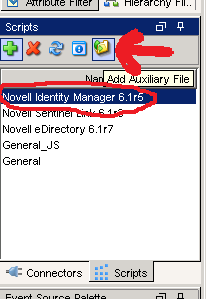
Once this is complete, the file needs to be added to the collector and used. To do this, go to Event Source Management in the Sentinel Control panel, select the Collector to be modified (IDM) and click the add auxiliary file button. Select the modified version of the file (do not change the name either!) and upload it.
Now that we have added the modified version of the file to our Sentinel environment, we need to tell Sentinel how to load that file. To do this, we grab the custom.js file from the Sentinel SDK. We need to add a line to a spot in the file to instruct Sentinel to load the modified version of the lsc file. The default file with the one line modification (modification in bold) looks like the following:
Finally, we have our modified LSC file and the javascript file that instructs sentinel to load the file, we just need to go ahead and tell Sentinel to execute the custom.js file that we uploaded. To do this, right click on the collector, select Edit from the menu and change the Execution Mode to 'custom'.
Once this is complete, we need to restart our collector manager. The way that I normally do this is from the Sentinel Control Center, under the Admin tab, I select the Collector manager, right click on it, then select restart. You should now be able to send your new custom events over and see them in Sentinel.
The next logical progression in Part 3 will be adding taxonomy information for your newly added event.
Event Name: Collector Internal MessageWhere 3E9 is the Hex value of the eventID used in the IDM Generate-Event action.
Message: Event ID not found in LSC file: 000303E9
The message gives a hint where to go to remedy the problem, but getting the full customization is where I found the most problems getting good documentation. I hope I can provide something that can act as a sample to go by to accomplish the task of getting the events showing up, as well as getting the data where we need it.
The first thing to do is find the LSC files in the collector scripts. If you take the zip file for the Novell IDM collector and unzip it, you'll find 2 different LSC files dirxml.lsc and rk4idm.lsc. I decided to use the rk4idm.lsc file to hold my customizations. It is very important that you use this file as a starting point and do not modify the existing data within it, we are simply going to extend this file with additional events.
At the bottom of my file, I added a comment (#) to distinguish my custom added events and some descriptions. Since all of the events are defined using hex instead of decimal values, I put a comment with the hex value above each event line. Then, start by using a known good event from the file.
#1200This event is already in the file. Please note that each field is separated by a comma, and the values correspond to the fields in the paradigm that looks like the following:
000304B0,Account Create By Entitlement Grant,Driver DN,Target Account DN or Association,Entitlement,Src Identity DN or GUID,Detail,IDM EventID,Status,N,,,Version,N,,,XML Document,S,Status $ST:$SB object:$SU level:$SY objet-type:$SS event-id:$SF from $iR
#EventID,Description,Originator Title,Target Title,Subtarget Title,Text1 Title,Text2 Title,Text3 Title,Value1 Title,Value1 Type,Value2 Title,Value2 Type,Value3 Title,Value3 Type,Group Title,Group Type,Data Title,Data Type,Display SchemaThese fields should line up one to one. Please also note, the text in each field is very important, they are referenced by a javascript file (will go over this later). For now, copy the event, change the first two values (eventID and Description fields) to the hex value of the IDM event and whatever description you want to hold. The Display Schema field (the last field) has references that start with $'s. There are two tables at the top that can be referenced to see what those construct. After the $ symbol, the first letter designates the data type and the second letter designates the data field.
The data type letters are as follows:
# Format (F):The data field letters are as follows:
# T - Time (UTC localized)
# D - Date (UTC localized)
# N - Number (32bit unsigned)
# N - Number (32bit signed)
# S - String
# X - Hexdecimal Number
# R - RFC822 format date/time
# I - IPv4 Internet Address (network order)
# i - IPv4 Internet Address (host order)
# B - Boolean (Yes/No)
# b - Boolean (True/False)
# Value (V):The display schema field can have any combination of text and the tokens for the fields above. Re-use different values from other events to parse similar data types. Please keep in mind, the text value for the field (for example, Driver DN in our sample message) is specific to that field. So a value for Text 1 Title will probably not work for Numerical Value 1 field.
# R - Source IP Address
# C - Platform Agent Date
# A - Audit Service Date
# B - Originator
# H - Originator Type
# U - Target
# V - Target Type
# Y - SubTarget
# 1 - Numerical value 1
# 2 - Numerical value 2
# 3 - Numerical value 3
# S - Text 1
# T - Text 2
# F - Text 3
# O - Component
# G - Group ID
# I - Event ID
# L - Log Level
# M - MIME Hint
# X - Data Size
# D - Data
Once this is complete, the file needs to be added to the collector and used. To do this, go to Event Source Management in the Sentinel Control panel, select the Collector to be modified (IDM) and click the add auxiliary file button. Select the modified version of the file (do not change the name either!) and upload it.
Now that we have added the modified version of the file to our Sentinel environment, we need to tell Sentinel how to load that file. To do this, we grab the custom.js file from the Sentinel SDK. We need to add a line to a spot in the file to instruct Sentinel to load the modified version of the lsc file. The default file with the one line modification (modification in bold) looks like the following:
// Javascript Collector Template 6.1This file also needs to be added to the specific collector in the same method as the lsc file.
// Developed by Novell Engineering
/**
* @fileoverview
* This file is used to create additional custom parsing methods for a Collector.
* These methods can be used to modify the initialization and parsing of the released
* Collector, to provide for local customization of operation.
* <p>To use:
* <ol>
* <li>Edit this file to define your custom initialization and parsing</li>
* <li>Run the 'ant build-custom' target to create the build version of this file</li>
* <li>Place the //content/build/${name}/custom/${name}.js file in:<br/>
* ESEC_HOME/data/collector_mgr.cache/collector_common<br/>
* ESEC_HOME/data/control_center.cache/collector_common<br/>
* (you may need to create these directories on each host where the Collector will run/debug)
* <li>Change the "Execution Mode" parameter for the Collector to "custom"
* <li>Restart the Collector
* </ul>
*/
/**
* This method is used to provide locally-defined custom initialization of the Collector.
* <p>Useful variables:
* <dl>
* <dt>instance.CONFIG.collDir</dt><dd>The directory that will contain all the Collector plugin files</dd>
* <dt>this.CONFIG.commonDir</dt><dd>The directory where this custom code resides - you can add additional files as necessary</dd>
* </dl>
* @return {Boolean} Result
*/
Collector.prototype.customInit = function() {
// load additional maps, parameters, etc
var file = new File(instance.CONFIG.collDir + "rk4idm.lsc");
return true;
}
/**
* This method is used to provide locally-defined custom pre-parsing of the input record.
* You might use this method if something in your environment modifies the normal input format,
* for example if the event is tunneled through some other protocol, you might strip off
* any additional headers that were added.
* @param {Object} e The output event
*/
Record.prototype.customPreparse = function(e) {
return true;
}
/**
* This method is used to provide locally-defined custom parsing of the input record.
* NOTE: There are two types of modifications that are typically peformed:
* <ul>
* <li>Modifications to the output of existing event fields: in this case, you may need to
* debug the Collector to determine which Record attribute is used to hold the data, and then
* perform your custom transformation on that data. For example:<br/>
* <pre>
* // Main code sets rec.evt to raw event name from device, but these overlap with
* // event names from other devices in our environment so are hard to distinguish.
* // We will add a prefix to help identify the events
* this.evt = "FW: " + this.evt;
* </pre></li>
* <li>Additional custom parsing that pulls more specific pieces of information out of the event,
* for example if a free-text field contains some info that you want to use to categorize events
* in your environment. In this scenario, you should:
* <ul>
* <li>Only use CustomerVars to hold the parsed-out data</li>
* <li>You will need to manipulate the Event object directly, as new additions to the Record object
* will be lost. The 'e' variable is used to access the Event object.</li>
* </ul>
* Use the 'CustomerVar1' through 'CustomerVar300' to hold your data. Refer to the documentation
* for the datatypes of those variables.
* <pre>
* // Want to extract the Department name that is injected into the "message" field
* e.CustomerVar21 = rec.message.substr(12,34);
* </pre>
* @param {Object} e The output event
*/
Record.prototype.customParse = function(e) {
return true;
}
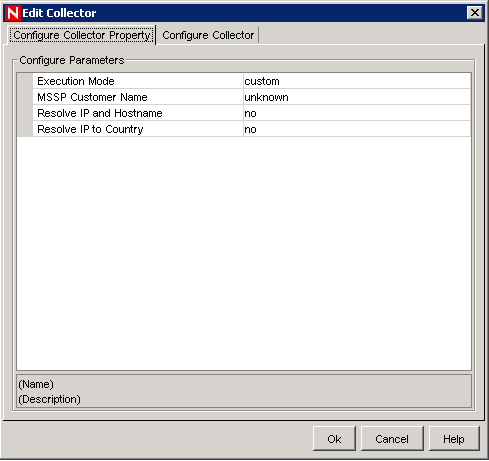
Finally, we have our modified LSC file and the javascript file that instructs sentinel to load the file, we just need to go ahead and tell Sentinel to execute the custom.js file that we uploaded. To do this, right click on the collector, select Edit from the menu and change the Execution Mode to 'custom'.
Once this is complete, we need to restart our collector manager. The way that I normally do this is from the Sentinel Control Center, under the Admin tab, I select the Collector manager, right click on it, then select restart. You should now be able to send your new custom events over and see them in Sentinel.
The next logical progression in Part 3 will be adding taxonomy information for your newly added event.
Novell IDM Integration with Novell Sentinel - Part 1
A few hundred Novell IDM drivers and a fully functional SIEM system (Sentinel). Why not kick over events from IDM to Sentinel? That part wasn't too bad, there is a collector specifically for Novell IDM that will kick a whole slew of events. Here is the monkey wrench, what if you want to leverage IDM to send custom events to Sentinel?
Let me begin from the start. In most instances, I find Novell's documentation to be much better than other vendors, but the Sentinel documentation doesn't seem to live up to the standards in which I have become accustomed. I had quite a bit of confusion as to the Platform Agent installation and configuration in order to get events successfully sent over to IDM. After much tedious research, I found that IDM automatically installs a version of the platform agent, so no additional Novell Audit installations are required.
As for configuration, it proved to be very straight forward, simply modify the C:\Windows\logevent.cfg file (please note, my customer environment is a pure windows shop, so tweaks will have to be made for suse and other OS's). The good part about this config file is there are comments explaining all of the different settings, mine looked like the following:
Where 10.1.1.1 is the IP address the Sentinel Collector Manager server is listening on for Novell IDM Audit events. This file should be setup for all Identity Vault servers to ensure all messages are sent to Sentinel.
The next thing to do is instruct IDM which events to kick out. In designer, go to the properties of the driverset which you would like to forward logs to Sentinel. On the Log Level portion, select which types of logs.
I would recommend selecting the "Log specific events" radio button, then selecting events from the list. Please note that the "Other" under "Status Events" will be used later. This will allow events created with the "generate-event" action in IDM to be shown within Sentinel.
Once all of the events are selected on the driverset and the logevent.cfg file is updated, you will need to bounce edirectory entirely for them to take effect. There may be a way to do it otherwise, but this was the easiest way to make it all take effect. Also note that this must be done on all servers in the driverset.
Now, the events will be sent to that IP address, but you may not have a collector manager listening on that port. Everything as far as setting up the Novell IDM collector is pretty straight forward. There is one thing to note as it may become an issue. In logevent.cfg we did not specify the port explicitly, therefore the audit events will be sent on the default port of 289. Please note that if the Collector Manager is installed on a Linux/Unix machine, the process must run as root to listen on any port below 1024. That being said, if Collector Managers are on Unix/Linux, I would recommend using port 1289, this will need to be defined in logevent.cfg as well as configured on the Sentinel environment.
Let me begin from the start. In most instances, I find Novell's documentation to be much better than other vendors, but the Sentinel documentation doesn't seem to live up to the standards in which I have become accustomed. I had quite a bit of confusion as to the Platform Agent installation and configuration in order to get events successfully sent over to IDM. After much tedious research, I found that IDM automatically installs a version of the platform agent, so no additional Novell Audit installations are required.
As for configuration, it proved to be very straight forward, simply modify the C:\Windows\logevent.cfg file (please note, my customer environment is a pure windows shop, so tweaks will have to be made for suse and other OS's). The good part about this config file is there are comments explaining all of the different settings, mine looked like the following:
LogHost=10.1.1.1
LogReconnectInterval=30
Where 10.1.1.1 is the IP address the Sentinel Collector Manager server is listening on for Novell IDM Audit events. This file should be setup for all Identity Vault servers to ensure all messages are sent to Sentinel.
The next thing to do is instruct IDM which events to kick out. In designer, go to the properties of the driverset which you would like to forward logs to Sentinel. On the Log Level portion, select which types of logs.
I would recommend selecting the "Log specific events" radio button, then selecting events from the list. Please note that the "Other" under "Status Events" will be used later. This will allow events created with the "generate-event" action in IDM to be shown within Sentinel.
Once all of the events are selected on the driverset and the logevent.cfg file is updated, you will need to bounce edirectory entirely for them to take effect. There may be a way to do it otherwise, but this was the easiest way to make it all take effect. Also note that this must be done on all servers in the driverset.
Now, the events will be sent to that IP address, but you may not have a collector manager listening on that port. Everything as far as setting up the Novell IDM collector is pretty straight forward. There is one thing to note as it may become an issue. In logevent.cfg we did not specify the port explicitly, therefore the audit events will be sent on the default port of 289. Please note that if the Collector Manager is installed on a Linux/Unix machine, the process must run as root to listen on any port below 1024. That being said, if Collector Managers are on Unix/Linux, I would recommend using port 1289, this will need to be defined in logevent.cfg as well as configured on the Sentinel environment.
Wednesday, October 27, 2010
ColdFusion 9 init script
Cloud migration is happening at GCA! Very exciting stuff. The cloud is great, we will no longer have to manage our own hardware, worry about the power situation, backup battery, snapshots, maintenance crap, or anything else associated with hosting our own websites.
The fun part of the whole thing is rebuilding the coldfusion stuff up in the cloud. Not a big deal, been there done that. The only quirk to the whole thing about building a Coldfusion 9 webserver on Ubuntu 10.04 LTS is that it does not have a valid startup script, so I created my own. Its nothing fancy, but gets the job done. Enjoy
#! /bin/sh
case "$1" in
start)
echo "Starting ColdFusion9" >&2
/opt/coldfusion9/bin/coldfusion start
exit 3
;;
restart)
echo "Restarting ColdFusion9" >&2
/opt/coldfusion9/bin/coldfusion restart
exit 3
;;
stop)
echo "Stopping ColdFusion9" >&2
/opt/coldfusion9/bin/coldfusion stop
exit 3
;;
*)
echo "Usage: $0 start|stop|restart" >&2
exit 3
;;
esac
:
Tuesday, August 31, 2010
ECMAScript to run a command on windows
I had the need to try to run a batch script on the command line using Novell IDM. I was able to develop a quick function in ECMAScript in order to accomplish this task. Simply call the following function from policy and pass it the full string of what you want run on the command line and it'll return any output it may return. Very simple, yet infinitely useful.
importPackage(Packages.java.io);
importPackage(Packages.java.util);
function runCommand(commandString)
{
var runtime = new java.lang.Runtime.getRuntime();
var process = runtime.exec(commandString);
var is = process.getInputStream();
var isr = new Packages.java.io.InputStreamReader(is);
var br = new Packages.java.io.BufferedReader(isr);
var line = new java.lang.String();
var fulltext = new java.lang.String();
while ((line = br.readLine()) != null )
{
fulltext = fulltext + line;
}
return fulltext;
}
Wednesday, June 2, 2010
Performance Tuning eDirectory
I have a particular eDirectory server that is one beefy sucker. This server is running Windows Server 2008 64bit with a whopping 32GB of memory. It's running 64bit eDirectory and the DIBFiles directory is about 1.2GB in size. I was looking at this box, which was only using about 500MB of memory. While the box is not struggling whatsoever, I was thinking, with 32GB of memory, why not start using some of that to jack up the performance as much as possible.
The first thing I did was max out the Java Heap Size for IDM (see yesterdays blog post) to 2GB (maximum for 32bit java). If, for whatever reason, the box actually uses all of this memory in the heap, I'll still have at least 28GB of memory left over. Why not just throw the entire directory into cache so that it performs wicked fast. I searched around on the Google debugger until I found an article by Novell on performance tuning with eDirectory. In this article I found some information on how to change the cache settings. There is a file (C:\Novell\NDS\DIBFiles\_ndsdb.ini on windows) that has memory settings. I made a quick change, then bounced eDirectory, and now my box will use up to 75% available memory for eDirectory cache.
The file before changes looked like this:
preallocatecache=true
cache=200000000
After my changes:
preallocatecache=true
cache=HARD, %:75, MIN:200000000
It took a while for it to use the cache, but after about 24 hours, dhost.exe is using up just over 3GB of memory instead of the 500MB it had accumulated over the period of a couple months.
For reference, the eDirectory performance tuning article was located here: http://www.novell.com/documentation/edir88/pdfdoc/edir88tuning/edir88tuning.pdf
The first thing I did was max out the Java Heap Size for IDM (see yesterdays blog post) to 2GB (maximum for 32bit java). If, for whatever reason, the box actually uses all of this memory in the heap, I'll still have at least 28GB of memory left over. Why not just throw the entire directory into cache so that it performs wicked fast. I searched around on the Google debugger until I found an article by Novell on performance tuning with eDirectory. In this article I found some information on how to change the cache settings. There is a file (C:\Novell\NDS\DIBFiles\_ndsdb.ini on windows) that has memory settings. I made a quick change, then bounced eDirectory, and now my box will use up to 75% available memory for eDirectory cache.
The file before changes looked like this:
preallocatecache=true
cache=200000000
After my changes:
preallocatecache=true
cache=HARD, %:75, MIN:200000000
It took a while for it to use the cache, but after about 24 hours, dhost.exe is using up just over 3GB of memory instead of the 500MB it had accumulated over the period of a couple months.
For reference, the eDirectory performance tuning article was located here: http://www.novell.com/documentation/edir88/pdfdoc/edir88tuning/edir88tuning.pdf
Tuesday, June 1, 2010
Performance Tuning Novell IDM
Working with IDM in a large environment. I needed to tune some memory parameters on IDM because I was getting Out of Memory errors on my JDBC drivers. The errors looked like the following:
I was able to tweak with these settings straight from Designer, but could also use iManager. For iManager, you simply go to Identity Manager Overview, then select Driverset properties once you are looking at the driverset. In the properties, it is under the Identity Management tab, Misc section (see screenshot below).
For designer, you simply go to the properties of the driverset object, select java and set your environment for the heap there (see below).
As you can tell, the values are the same (as they should be). I set it to 640MB, which is fairly high, but I will be running many JDBC drivers in this driverset on this server, so I will use that memory. The default value is 64MB, and it is recommended to increase this in increments of 64-128MB at a time. In order for these settings to take effect, eDirectory must be restarted. Please note, this setting is on a per server basis and must be tweaked as such.
There is the potential to set this value too high. One symptom that you will observe if this value is set too high is the dhost.exe process will consume a very small amount of memory relative to the previous it was using and your IDM drivers do not start at all. This is a hint that you have set the value too high and need to set it lower.
If you are using a tree that only has one server and you hose this up, it is possible that eDirectory will not even start. This becomes problematic because you need eDirectory started in order to change this setting. To resolve your problem, you can prevent the DirXML portion of the eDirectory stack from starting by renaming the following file and starting eDirectory. At this point you should be able to change the cache value and move on:
C:\Novell\NDS\dirxmllib.dll
DirXML Log Event -------------------
Driver: \VAULT\ORG\ESC\DirXML\DRIVERSET\HMS S00177
Channel: Publisher
Status: Error
Message: Code(-9010) An exception occurred: java.lang.OutOfMemoryError: Java heap space
at java.util.Arrays.copyOf(Arrays.java:2786)
at java.io.ByteArrayOutputStream.write(ByteArrayOutputStream.java:94)
at sun.nio.cs.StreamEncoder.writeBytes(StreamEncoder.java:202)
at sun.nio.cs.StreamEncoder.implFlushBuffer(StreamEncoder.java:272)
at sun.nio.cs.StreamEncoder.implFlush(StreamEncoder.java:276)
at sun.nio.cs.StreamEncoder.flush(StreamEncoder.java:122)
at java.io.OutputStreamWriter.flush(OutputStreamWriter.java:212)
at java.io.BufferedWriter.flush(BufferedWriter.java:236)
at java.io.PrintWriter.flush(PrintWriter.java:276)
at com.novell.nds.dirxml.driver.jdbc.util.JDBCLib.GetStackTrace(Unknown Source)
at com.novell.nds.dirxml.driver.jdbc.util.JDBCLib.UnhandledException(Unknown Source)
at com.novell.nds.dirxml.driver.jdbc.JDBCPublicationShim.start(Unknown Source)
at com.novell.nds.dirxml.driver.jdbc.JDBCPublicationProxy.start(Unknown Source)
at com.novell.nds.dirxml.engine.Publisher.run(Publisher.java:420)
at java.lang.Thread.run(Thread.java:619)
I was able to tweak with these settings straight from Designer, but could also use iManager. For iManager, you simply go to Identity Manager Overview, then select Driverset properties once you are looking at the driverset. In the properties, it is under the Identity Management tab, Misc section (see screenshot below).
For designer, you simply go to the properties of the driverset object, select java and set your environment for the heap there (see below).
As you can tell, the values are the same (as they should be). I set it to 640MB, which is fairly high, but I will be running many JDBC drivers in this driverset on this server, so I will use that memory. The default value is 64MB, and it is recommended to increase this in increments of 64-128MB at a time. In order for these settings to take effect, eDirectory must be restarted. Please note, this setting is on a per server basis and must be tweaked as such.
There is the potential to set this value too high. One symptom that you will observe if this value is set too high is the dhost.exe process will consume a very small amount of memory relative to the previous it was using and your IDM drivers do not start at all. This is a hint that you have set the value too high and need to set it lower.
If you are using a tree that only has one server and you hose this up, it is possible that eDirectory will not even start. This becomes problematic because you need eDirectory started in order to change this setting. To resolve your problem, you can prevent the DirXML portion of the eDirectory stack from starting by renaming the following file and starting eDirectory. At this point you should be able to change the cache value and move on:
C:\Novell\NDS\dirxmllib.dll
Wednesday, May 26, 2010
eDirectory Installation Errors
More troubleshooting fun today. Large customer, lots of users, lots of drivers, needed more horsepower. How do we get more horsepower? That's easy, throw another server in the mix. Step one of adding a new server to IDM, install eDirectory and join it to the tree. This is where I got hung up and for some reason it actually took a little while to click in my head.
I was starting the installation, then receiving timeout errors. Come to find out, I had forgot to turn off the stupid Windows Firewall. It was blocking the replication and all of the other things I need to work to get the tree working. My install should work now, but I need to go through and cleanup that old install and get cracking on the new one, there are a few things that I have to do for this to work.
First, I had to do the basic Add/Remove programs thing. Of course, being Windows, this rarely, if ever, actually removes the entire program. The next step was to go remove the C:\Novell directory in its entirety. I had to escalate to admin privileges for this.
At this point, you would think it works, but it does not. The stupid NDS console thing still exists in the control panel and needs to be removed. This is the tricky one. To remove this (and complete the uninstall), you must remove the following file:
C:\Windows\System32\NDScpa.cpl
Now, you can actually start the eDirectory installation again, but you have another problem. The eDirectory object name for the server already exists. Due to the installer crashing out early, you must go and manually delete two objects from the directory. The server object and the ndsPredicateStats object. Both will be named pretty obviously specific to your server (unless you changed them, in which case, shame on you).
After this, you can continue the installer (this time without the windows firewall!) and everything is happy.
I was starting the installation, then receiving timeout errors. Come to find out, I had forgot to turn off the stupid Windows Firewall. It was blocking the replication and all of the other things I need to work to get the tree working. My install should work now, but I need to go through and cleanup that old install and get cracking on the new one, there are a few things that I have to do for this to work.
First, I had to do the basic Add/Remove programs thing. Of course, being Windows, this rarely, if ever, actually removes the entire program. The next step was to go remove the C:\Novell directory in its entirety. I had to escalate to admin privileges for this.
At this point, you would think it works, but it does not. The stupid NDS console thing still exists in the control panel and needs to be removed. This is the tricky one. To remove this (and complete the uninstall), you must remove the following file:
C:\Windows\System32\NDScpa.cpl
Now, you can actually start the eDirectory installation again, but you have another problem. The eDirectory object name for the server already exists. Due to the installer crashing out early, you must go and manually delete two objects from the directory. The server object and the ndsPredicateStats object. Both will be named pretty obviously specific to your server (unless you changed them, in which case, shame on you).
After this, you can continue the installer (this time without the windows firewall!) and everything is happy.
Tuesday, May 25, 2010
Novell IDM Syntax Violation Errors
I was recently working on a driver. I had finished the driver and everything was working great. I then started getting the following errors on my driver:
Code(-9010) An exception occurred: novell.jclient.JCException: createEntry -613 ERR_SYNTAX_VIOLATION
After yanking out some of the hair on my scalp, I took two traces, one of a user that was created successfully, and one of a user that kicked back this error. I looked at the XML document after all the driver logic was finished just before it tried to create the account.
What I found was there were very few differences (I hope not), but what ended up standing out is that in one of the traces, the user had a blank value for their Title attribute, and looked similar to this:
<add-attr attr-name="Title">
<value type="string"/>
</add-attr>
Why is this significant? Because if you look at the schema for eDirectory, the attribute Title is sized, with a minimum length of 1 character, meaning a blank attribute is not valid.
The resolution for this was simple. I found all attributes that had sizing restrictions on them, then simply did a check and stripped them out if they had a blank value. Here is what the Title attribute sample looked like:
<rule>
<description>Strip Title if blank</description>
<comment xml:space="preserve">If title is a blank value, strip it so it doesn't cause a syntax violation.</comment>
<conditions>
<and>
<if-class-name mode="nocase" op="equal">User</if-class-name>
<if-op-attr mode="nocase" name="Title" op="equal"/>
</and>
</conditions>
<actions>
<do-strip-op-attr name="Title"/>
</actions>
</rule>
Once this was done all of the errors disappeared!
Code(-9010) An exception occurred: novell.jclient.JCException: createEntry -613 ERR_SYNTAX_VIOLATION
After yanking out some of the hair on my scalp, I took two traces, one of a user that was created successfully, and one of a user that kicked back this error. I looked at the XML document after all the driver logic was finished just before it tried to create the account.
What I found was there were very few differences (I hope not), but what ended up standing out is that in one of the traces, the user had a blank value for their Title attribute, and looked similar to this:
<add-attr attr-name="Title">
<value type="string"/>
</add-attr>
Why is this significant? Because if you look at the schema for eDirectory, the attribute Title is sized, with a minimum length of 1 character, meaning a blank attribute is not valid.
The resolution for this was simple. I found all attributes that had sizing restrictions on them, then simply did a check and stripped them out if they had a blank value. Here is what the Title attribute sample looked like:
<rule>
<description>Strip Title if blank</description>
<comment xml:space="preserve">If title is a blank value, strip it so it doesn't cause a syntax violation.</comment>
<conditions>
<and>
<if-class-name mode="nocase" op="equal">User</if-class-name>
<if-op-attr mode="nocase" name="Title" op="equal"/>
</and>
</conditions>
<actions>
<do-strip-op-attr name="Title"/>
</actions>
</rule>
Once this was done all of the errors disappeared!
Thursday, May 20, 2010
Sharing Policies between Drivers in Novell IDM
Working with Novell IDM to integrate an HMS Payroll System hosted on an AS400 system in a DB2 database. The customer has approximately 120 of these databases that need to be interfaced. In order to accomplish this, I need to create 120 separate JDBC drivers.
I was able to architect and implement the drivers in such a way that all of the policies are identical. The only differences between them are the connection parameters and some GCV's. With all of the policies identical, I wanted to deploy them in such a way that updates to the drivers are easier than duplicating the modification 120 times.
By creating a new Library container within the driverset, I was able to reference the policies within the drivers from the shared Library. This allows all of the drivers to subscribe to the same policy and XSL objects. When an update needs to occur for the 120 drivers, the policy in question is updated in the library, then all of the drivers are restarted.
To expedite the process of restarting all of the drivers, I simply restart DirXML on the servers hosting the drivers. This will force a restart of these drivers, so long as they are set to automatic startup.
Please note that the Filter cannot be shared as it must exist on the driver object, so changes to filter will still require changing all 120 drivers individually.
I was able to architect and implement the drivers in such a way that all of the policies are identical. The only differences between them are the connection parameters and some GCV's. With all of the policies identical, I wanted to deploy them in such a way that updates to the drivers are easier than duplicating the modification 120 times.
By creating a new Library container within the driverset, I was able to reference the policies within the drivers from the shared Library. This allows all of the drivers to subscribe to the same policy and XSL objects. When an update needs to occur for the 120 drivers, the policy in question is updated in the library, then all of the drivers are restarted.
To expedite the process of restarting all of the drivers, I simply restart DirXML on the servers hosting the drivers. This will force a restart of these drivers, so long as they are set to automatic startup.
Please note that the Filter cannot be shared as it must exist on the driver object, so changes to filter will still require changing all 120 drivers individually.
Wednesday, May 19, 2010
Novell IDM CSV Fanout Driver
In a traditional Novell IDM CSV driver, you have one event, which will create one output CSV file. You can use the output transform to format the CSV files output so it does not necessarily have to be a true CSV file, but a text file of any format you wish.
I was recently presented with a unique challenge where I needed upwards of 120 or so CSV files for a single event. The total number of files was dependent on a few factors, but they are irrelevant as that logic was programmed in policy. The part that was pretty nifty was creating my own version of a CSV fanout driver.
Instead of using the traditional CSV driver, I used a Null Services driver. I used typical policy to determine my outputs, but did so in a loop, so I could loop through each iteration of an output. Each time I hit a valid output, I constructed my text file format and held it in a local variable. It looked something like this:
<do-set-local-variable name="lv.outputString" scope="policy">
<arg-string>
Construct string here
</arg-string>
</do-set-local-variable>
I then added a ECMAScript object to my driver and added it to the driver configuration. The ECMAScript was very simple:
importPackage(Packages.java.io);
function writeFile(fileName, contentString)
{
try {
var printFile = new Packages.java.io.PrintStream(fileName);
printFile.print(contentString);
printFile.close();
return "";
} catch (e) {
return e.toString();
}
}
All I needed to do at this point was use an XPATH expression to call my ECMAScript function. I pass it the path to the file I want to create and the string I created. The function will create the file with the contents I specified.
The only thing to note about this is you will need to use unique filenames. The way I found to most easily do this is to use a timestamp. The following file path uses a timestamp down to the millisecond, so it should always be unique.
<do-set-local-variable name="lv.outputFile" scope="policy">
<arg-string>
<token-global-variable name="outputfilelocation"/>
<token-text xml:space="preserve">\</token-text>
<token-time format="yyyyMMddHHmmssSSS"/>
<token-text xml:space="preserve">.csv</token-text>
</arg-string>
</do-set-local-variable>
Once we have the output file string, the contents string, and the ECMAScript object created and added to the driver, we just need to use our XPATH expression to call it and write out our files.
<do-set-local-variable name="result" scope="policy">
<arg-string>
<token-xpath expression="es:writeFile($lv.outputFile,$lv.outputString)"/>
</arg-string>
</do-set-local-variable>
The local variable "result" is holding the return value, which should be blank. If it is not blank, then there was a problem and the exception that was caught should be held in this value. This can be used for simple error checking.
I was recently presented with a unique challenge where I needed upwards of 120 or so CSV files for a single event. The total number of files was dependent on a few factors, but they are irrelevant as that logic was programmed in policy. The part that was pretty nifty was creating my own version of a CSV fanout driver.
Instead of using the traditional CSV driver, I used a Null Services driver. I used typical policy to determine my outputs, but did so in a loop, so I could loop through each iteration of an output. Each time I hit a valid output, I constructed my text file format and held it in a local variable. It looked something like this:
<do-set-local-variable name="lv.outputString" scope="policy">
<arg-string>
Construct string here
</arg-string>
</do-set-local-variable>
I then added a ECMAScript object to my driver and added it to the driver configuration. The ECMAScript was very simple:
importPackage(Packages.java.io);
function writeFile(fileName, contentString)
{
try {
var printFile = new Packages.java.io.PrintStream(fileName);
printFile.print(contentString);
printFile.close();
return "";
} catch (e) {
return e.toString();
}
}
All I needed to do at this point was use an XPATH expression to call my ECMAScript function. I pass it the path to the file I want to create and the string I created. The function will create the file with the contents I specified.
The only thing to note about this is you will need to use unique filenames. The way I found to most easily do this is to use a timestamp. The following file path uses a timestamp down to the millisecond, so it should always be unique.
<do-set-local-variable name="lv.outputFile" scope="policy">
<arg-string>
<token-global-variable name="outputfilelocation"/>
<token-text xml:space="preserve">\</token-text>
<token-time format="yyyyMMddHHmmssSSS"/>
<token-text xml:space="preserve">.csv</token-text>
</arg-string>
</do-set-local-variable>
Once we have the output file string, the contents string, and the ECMAScript object created and added to the driver, we just need to use our XPATH expression to call it and write out our files.
<do-set-local-variable name="result" scope="policy">
<arg-string>
<token-xpath expression="es:writeFile($lv.outputFile,$lv.outputString)"/>
</arg-string>
</do-set-local-variable>
The local variable "result" is holding the return value, which should be blank. If it is not blank, then there was a problem and the exception that was caught should be held in this value. This can be used for simple error checking.
Novell IDM Fun at a Large Hospital
I’ve been working with a large hospital chain and working on solving some pretty complex challenges. Recently, we have been working on implementing some McKesson applications within their organization, but we also wanted to implement it with the concept of ‘Roles’ kept in mind.
Let me first start with our application challenges. The two most commonly used McKesson applications are HCI and HPP. For HCI, we found that there is an engine underneath called cloverleaf that uses a standard protocol called HL7 to send messages around. We have three options to explore. The first is a proprietary HL7 driver that will connect to an HL7 listener, and pass it a carefully constructed HL7 message (the message I have to construct in the driver output transform). The second is to use an HL7 emulator that is already in place to consume a text file in the format of that same HL7 message. The third is to use an open API that I found to open a socket using the java api. I can call the java api from ECMAScript and use an XPath expression within my driver to do it. Once I open the socket, I simply pass the same HL7 message used by the other two steps through it. Currently, I’m debugging option three, and we have already done some preliminary testing on option 2. If we can’t get option 3 working, we can fall back on 2.
For HPP, we did something pretty nifty as well. The customer identified an API that could be used to interface with the HPP database. They stood up a web service that I could send calls to in a very specific format to add/modify/disable users from that system. I simply construct a URL with a bunch of arguments on the end and call the URL. The webserver will take the URL, process the transaction and post back a return code instead of a bunch of HTML. Very simple implementation. The key part was to encrypt the arguments so I wouldn’t be sending username and password combinations over the wire in clear text. I did this by implementing an encryption protocol using ECMAScript and XPath within my driver. So now, my URL has a bunch of seemly meaningless characters on the end, but the webserver can decode this into a meaningful set of arguments.
The next challenge for implementing these two applications came up when the customer requested to not have over 200 drivers to do this implementation. There are over 100 locations for this customer and each location has an HCI and HPP implementation. We needed to architect the drivers in such a way that one HCI or HPP driver could service more than one location. Just to add a little more fun and complexity, the customer also wants the “Roles” concept to be built in as well.
I worked with the customer and we kicked ideas back and forth until we came up with what we thought would be a great implementation. We took the idea of a ‘role’ and decided to turn it into an edirectory object. We also decided that we may as well make each ‘facility’ its own object as well. We already have objects for each ‘user’. Here is how they all tie together. For HCI, there will be a ‘role’ for each role in that system (or you can define a role in HCI as a combination of attributes that consists of access to that system). For each facility, we will create a ‘facility’ object. We already have a ‘user’ object for each user in their system. So, now we have a ‘role’ object with a bunch of attributes that define what the “Nurse” role in the HCI system consists. We also have a facility object for Hospital 123, with some attributes telling us information about that location, such as the location of its HCI system, the port number, private key file used for securely coping files over, and such. The only information we need to store on the actual user is what role and what facility (Role – Nurse, Facility – 123).
Due to the fact that a user at this customer could potentially have access to multiple locations at the same time, we had to ensure that the attribute where we store the role and facility for HCI and HPP were multivalued. So, we now have two attributes attached to user (well, attached to an aux class, which is attached to our users). These two attributes are multivalued lists of facilities with roles. We now have what access and where it should be provisioned in a list format attached to each user.
In the actual logic, we keep an eye on this attribute to know when we need to provision/deprovision/modify an account on a respective system. I used a series of loops to go through each value and did ECMAScript functions with XPath calls to actually write out files or call URL’s. This allowed me to service multiple sites with a single driver. I just used a multivalued GCV on the driver to list which facilities are supported by this driver (so I could split the load if required). When the driver determined work needed to be done for a user, I would retrieve the access information from the role object using an XPath call, then retrieve the information on where to provision this information from the facility object, tag all that information with what I need from the user (username, password, etc), then make my call.
We were able to successfully implement complex IDM systems, such as McKesson HCI and HPP, using the out-of-the-box Novell IDM components and some creative architecture. This also gave us the ability to grant roles into the framework and service multiple sites with a single driver for each system. The drivers can be split up if required for load balancing. Also, if a role needs to be modified in the future, we simply need to modify the ‘role’ object in question, without having to touch the potentially thousands of users subscribing to that ‘role’.
Labels:
Enterprise,
Hospital,
Identity Management,
Identity Manager,
IDM,
Novell,
Novell IDM
Subscribe to:
Posts (Atom)


